 Our Team
 Our Showroom
 Our Clients
 Why Luxury?
 What's Included?
 We Travel!
 Careers
 Become a Dealer
 Contact Us!
 Our History
 Why Us?
 Our Molds
 Transportation
 Our Warranty
 COLOR Range
 Fiberglass Pool Photo Gallery
 Testimonials
 Design Ideas
 Educational
 Construction
 Pool School
 My pool will cost how much?
 Pool Costs
 Keeping Costs Down
 Pool Financing
 Pool Articles
 Buying a fiberglass pool - Step 1
 Buying a fiberglass pool - Step 2
 Buying a fiberglass pool - Step 3
 Questions you may have
 Why fiberglass?
 Compare Pools
 Moroccan
  Pacific
  Cayman
  Key West
  Palm Beach
  Outback
  Malibu
  Elegance
  Caribbean
  Riviera
  Fiji
Fiji  Mediterranean
  Roman
Roman  Reflection
  Palladium
  Crispin
  Square Style
 Free Form Style
 Kidney Style
 Roman Style
 Modern Style
 Plunge Style
 Spas and Tanning Style
 Lounger Style
 Fiberglass Pool Cost Estimator
 Quote Request
 Schedule A Design Meeting
 Chemistry Calculator
 Balancing My Water
 Servicing Your Equipment
 Pool Equipment Manuals
 Pool FAQs and Troubleshooting
 Chemistry Record Sheet
 Pool Openings
 Pool Closings
 Pool Service
 Pool Equipment
 Automatic Pool Covers
 Pool Heaters
 Electric Service Upgrade
 Safety / Anti-Entrapment
 Install Packages
 Winter Pool Covers
 Pool Fencing
 Pool Aprons
 Concrete Pool Aprons
 Paver Pool Aprons
 Snow Removal
 Free Clean Fill Dirt
 Fiberglass Pool
 Fiberglass Pool
Automatic Pool Cover Wireless Remotes
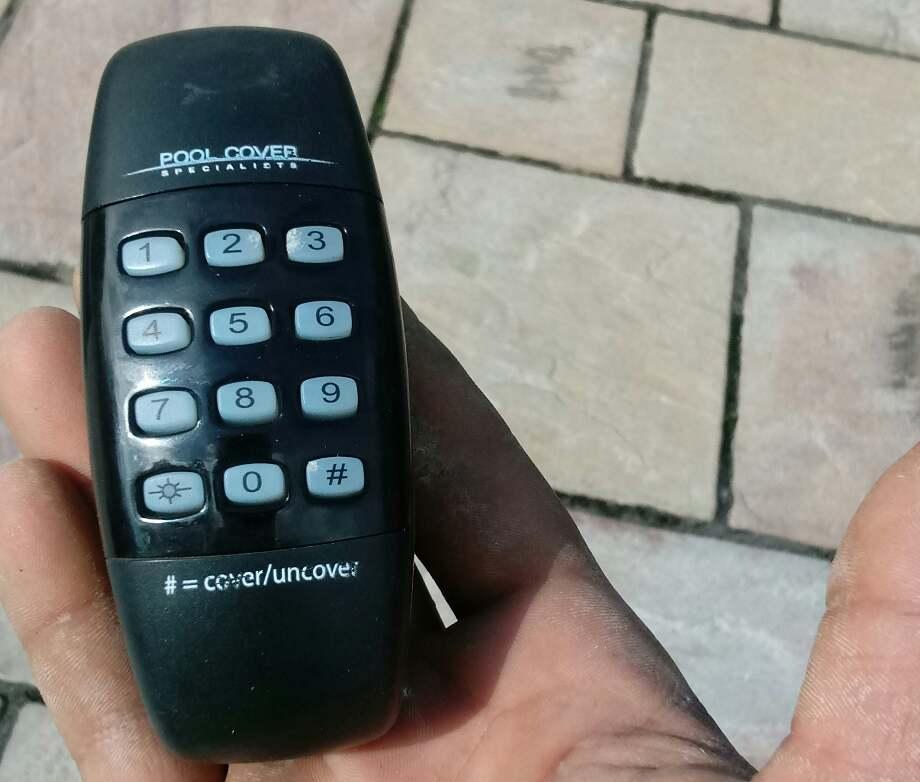
As many of you may know this season (2012) PCS has had some difficulty obtaining and providing us wireless remotes used to control the Infinity 4000. As of this week we have finally received a suitable remotes and have installed them to most of those waiting. We have left you the remote, along with screws to permanently mount the remote pad outside. You will notice once the back of the mount is attached to the house the remote portion of the unit will pop off allowing you to take the remote inside for winter (highly recommended) and replace the batteries when needed. Please make sure you when you mount your remote you position it if FULL site of the pool.
Two codes are used to operate your wireless automatic pool cover remote. Default for opening the cover is 1, 2, 3, 4, press and hold #. Default for closing is 4, 3, 2, 1, press and hold #. To stop the cover from opening or closing just release the # key.
Directions for changing the code:
Before programming new codes, you first have to delete the default codes from the touchpad.
- Hold the # key until you hear the touchpad beep
- Enter master code (123456), then the # key
- Enter first default code (1234), then the # key
- Hold the # key until you hear the touchpad beep
- Enter master code (123456), then the # key
- Enter second default code (4321), then the # key
Now you can enter your personal codes
- Hold the # key until you hear the touchpad beep
- Enter master code (123456), then the # key
- Then you will hit the 1 key (for the first channel)
- Then you will enter the 4 digit code to open the cover, then the # key
- After you hit the # key do not hit any keys until the touchpad times out, indicated by two beeps. If any keys are hit before then it will not accept the code.
- Hold the # key until you hear the touchpad beep
- Enter master code (123456), then the # key
- Then you will hit the 2 key (for the second channel)
- Then you will enter the 4 digit code to close the cover, then the # key
- After you hit the # key do not hit any keys until the touchpad times out, indicated by two beeps. If any keys are hit before then it will not accept the code.
- Record your two personal codes.
11470 Hawke Rd, Columbia Station, OH 44028 | Cleveland (440) 237-7665
9295 Franklin Rd, Murfreesboro, TN 37128 | Nashville (615) 900-2181
Copyright Luxury Pools and Living 2005-2025